Spinning Center App
Version: 2.0.800
50.00MB
4.5
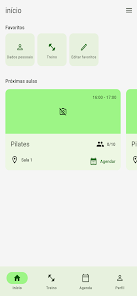
The Spinning Center App is a purpose-built mobile companion for students at participating gyms who want to keep their indoor cycling routine organized and accessible. Designed to centralize class schedules, bookings and workout access, the Spinning Center App puts essential tools in your pocket so you can check class times, reserve a spot, receive messages from your studio, and review training information without having to wait at the front desk. The introduction is practical and aimed at regular attendees and busy fitness enthusiasts who value simple, reliable scheduling and attendance tools.
The app bundles scheduling, reservation and messaging into a single view so you can see available classes, join a waitlist, or confirm a booking from your phone. Built-in notifications keep you informed about openings, instructor messages and last-minute changes. Workout access lets you open stored training plans and session notes associated with classes at your facility, making it easy to prepare for a ride or revisit a past session. Check-in functions streamline arrival at the studio and reduce time spent at reception by handing you booking confirmation on demand.
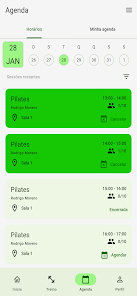
Class times are presented in a clean, scrollable calendar that reflects the roster maintained by your gym; when a class reaches capacity the app offers a waitlist option and alerts you if a seat becomes available. Booking flow is straightforward: select a class, confirm your spot and receive a timestamped confirmation that can be used for check-in. Push and in-app notifications are configurable so you choose how and when the app reminds you about upcoming sessions or messages from the studio. The system relies on each participating gym’s backend, so availability and timing align with the studio’s published schedule.
Rather than presenting generic fitness claims, the Spinning Center App focuses on preserving and presenting the workout content your gym provides. Workouts are organized by date, instructor and intensity level where available, allowing you to review previous sessions and track personal progress over time. Consistent attendance and repeated use of the same class types create a natural progression that you can follow in the app through saved workout notes and session history. The app makes it easy to plan week-to-week training by showing recurring classes and recommended follow-up sessions when they are listed by the studio.
Navigation uses simple, clearly labeled sections for Schedule, Bookings, Workouts and Messages so you can reach common tasks in a few taps. Buttons are sized for easy use on typical phone screens and the layout favors legible typography and high-contrast elements to assist visibility under varied lighting. The visual approach is functional rather than flashy: the interface emphasizes clarity of time, location and instructor information so you can act quickly when signing up or checking in before a ride.
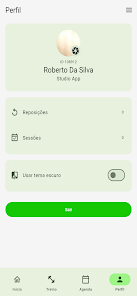
The app supports personalized settings such as preferred notification lead times, saved favorite classes or instructors, and quick-access booking for the sessions you attend most often. Being able to re-open past workouts and re-book similar classes sustains replay value: riders can reproduce training sessions, compare notes with previous rides, and maintain a consistent schedule without repeated manual searching. These conveniences encourage routine and make the app a practical tool for maintaining long-term participation.
The app includes accessibility-friendly elements like adjustable text scaling and interface contrast to improve usability for more users, and it leverages the phone’s native notification system so alerts behave consistently with other apps. Basic offline capability allows access to previously viewed schedules and downloaded workout details when connectivity is intermittent, but live booking and seat confirmations require an online connection because they interact with the gym’s reservation system. Account data and messages are managed by the participating studio’s systems; the app respects those boundaries and indicates when a feature is handled by your facility.
Availability is limited to students at participating gyms, and some tools depend on the gym’s internal systems and policies, so exact behavior may vary by location. The Spinning Center App does not attempt to replicate or replace studio-managed functionality such as membership administration, payments or equipment rentals; instead it provides a streamlined interface to the scheduling, booking and workout content your gym chooses to publish through the platform.
To begin, download the app, create an account or sign in with the credentials your gym provides, then select your home facility to load its class schedule and workout library. The Spinning Center App will guide you through booking your first class, joining a waitlist and setting notification preferences so you get timely reminders. If your gym participates, this simple setup takes only a few minutes and immediately brings your cycling routine onto your phone for easier planning and attendance.