CookingTimerPro
Version: 4.5.6
43.00MB
4
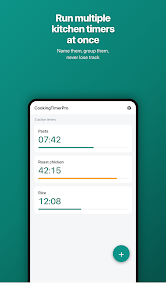
CookingTimerPro is a focused kitchen utility that helps home cooks and busy households manage multiple dishes at once. Designed to reduce clock-watching and to support practical meal preparation, CookingTimerPro centralizes independent timers so you can concentrate on technique, ingredients and plating instead of juggling alarms. The app is compact, works offline, and delivers unmistakable alerts and clear progress indicators to make multi-step cooking sessions more predictable.
CookingTimerPro supports several independent timers that you can name, color-code and set to precise durations. Each timer displays both elapsed and remaining time with a visual ring or progress bar, and you can view timers simultaneously to compare stages at a glance. Notifications are sent as system alerts with optional sounds and vibration so you receive reminders even when the screen is locked or you are using other apps. Timers may be started, paused and reset individually, and an active timer’s remaining duration can be adjusted without stopping it, which is useful for recipes that need an extra minute or two rather than a complete restart.
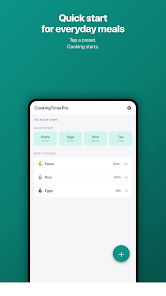
The interface emphasizes quick, tactile gestures to keep your hands free during busy prep. Tap to create or start a timer, swipe to reveal edit and delete controls, and long-press to access secondary options such as pause, reset or duplicate a timer. Time entry supports direct numeric input for exact settings or preset increments for rapid setup when you need to get back to chopping. Visual labels and color accents help you match timers to pots, pans or oven racks so you always know which item is referenced without reading small text.
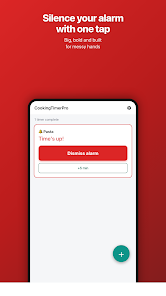
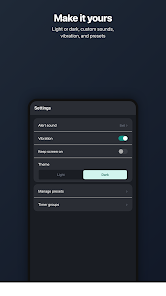
CookingTimerPro provides straightforward customization to fit different kitchens and workflows: choose distinct colors for each timer to reduce mix-ups, select from a range of alert tones or mute sounds for quiet environments, and enable vibration-only alerts when hands are wet or messy. Accessibility options include adjustable font sizes, high-contrast themes for bright stovetop lighting and concise notification text that plays well with screen readers. These settings make the app usable for a wide range of cooks, from those who prefer minimalist displays to users who need larger text and clearer contrast.
The app is optimized for offline use and does not require a persistent internet connection, so timers continue running even when mobile service is unavailable or when the device is put to sleep. Background operation ensures timing remains accurate while you switch between apps or step away from the phone. The layout keeps essential controls within thumb reach and groups timers visually to reflect typical cooking sessions, reducing cognitive load and helping you focus on ingredients and doneness checks rather than navigation within the app.
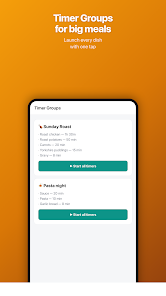
Rather than gamelike progression, CookingTimerPro supports procedural workflows by letting you label timers for stages such as sear, simmer, rest or glaze so a multi-step recipe can be tracked as a sequence. You can set staggered start times to coordinate finish times across multiple components so everything comes together at the same moment. Reusing labeled templates or duplicating a common setup speeds repeat meals and creates a predictable progression for frequently prepared dishes, which effectively acts as a simple, practical progression system for household cooking.
The visual design is intentionally uncluttered: clear rings or bars for each timer, concise labels and a restrained color palette to avoid distraction under bright kitchen lights. Timers can be grouped together to represent a full recipe or separated by station—oven, stove, counter—so the session structure mirrors a real-world cooking plan. This approach helps you scan the overall state at a glance and prioritize which tasks need immediate attention.
CookingTimerPro gains value through repeated use: familiar labels, saved setups and consistent timing habits make meal prep faster and more reliable over time. The app rewards routine rather than points, turning timing into a dependable part of kitchen technique and reducing waste from overcooking. Its simplicity encourages adoption for daily meals as well as occasional multi-course cooking projects.
Setup is manual by design, so complex sessions require a small time investment to label and arrange timers; plan a few minutes before you begin for the best results. The app provides precise timing but cannot determine doneness for you—use CookingTimerPro as a prompt for visual, tactile and olfactory checks, especially with delicate techniques like caramelizing or searing. For safety, keep the device away from heat and liquids and use the app in combination with standard kitchen practices.
CookingTimerPro is a lightweight, reliable companion for organizing kitchen timing across multiple dishes. By combining independent timers, simple customization, accessibility features and offline reliability, the app helps cooks of all levels coordinate components, improve consistency and manage complex meals with less stress.