Crochet
Version: 1.0.1
162.48MB
4.1
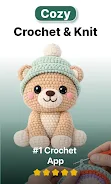
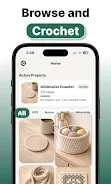
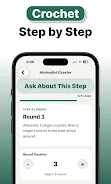
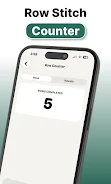
Crochet is a focused learning and project-management app that helps beginners move from basic stitches to finished pieces with confidence. The app combines clear step-by-step lessons, guided projects, and a compact set of handheld tools so new crafters can practice, track progress, and complete real projects without confusion. In the first lessons you learn core stitches and simple patterns, then advance through structured projects that reinforce technique while producing usable items; Crochet emphasizes achievable results, a calm editing-style interface, and utilities such as a stitch counter and row tracker to keep every session organized.
The app’s lesson library is tailored for people who have never crocheted before: each lesson breaks a stitch or technique into short, timed steps with photos and short notes that show how to set up, hold the yarn and hook, and correct common errors. Guided projects act like mini-courses, pairing a sequence of lessons with a single pattern so you complete a scarf, hat, or small toy from start to finish. Built-in tools include an easy-to-access stitch counter and row tracker, a size calculator to estimate finished dimensions from your gauge, and pattern bookmarks so you can return to an instruction at any time. Crochet also offers a simple project view where you can see steps, tools, yarn requirements and an estimated completion time for each item, helping you choose projects that fit your schedule.
Navigation is gesture-driven and intentionally simple: swipe to move between steps, tap images to enlarge, and use a persistent control bar for the stitch counter and row tracker. Lessons are modular, so you can repeat individual steps without reloading an entire lesson. Patterns are presented in progressive stages rather than a long sheet of instructions, which reduces context switching while you work. The app keeps a local record of your active project and archives completed projects for reference; notes and photo attachments can be added to any entry so you can document gauge adjustments or color choices as you go. These workflow choices make Crochet suitable for short practice sessions as well as longer crafting blocks.
Progress through structured modules that unlock as you complete core exercises, giving a gentle sense of advancement without gamification. Each completed project opens access to follow-up patterns that reuse learned skills at slightly higher difficulty, creating a practical progression system where new stitches are introduced in the context of use. Replay value comes from variations: you can rework a guided project in different yarn weights, colors, or sizes and use the size calculator and stitch assistance to adapt patterns. The app encourages daily practice with quick drills and focused troubleshooting so skills are reinforced over multiple short sessions instead of a single long tutorial.
Crochet’s toolkit includes customizable stitch counters, a row tracker with manual or tap-based increments, and a size calculator for planning dimensions. Patterns can be filtered by difficulty, estimated time, and yarn type to help you choose suitable projects; you can also save favorite patterns to a personal library. A Pro upgrade unlocks premium conveniences such as photo-based stitch identification to help recognize unfamiliar textures, the ability to manage multiple active projects simultaneously, and an expanded lesson library with finer-grained technique breakdowns. The free tier remains useful for getting started and completing basic guided projects before deciding whether to upgrade.
The interface favors clean, readable typography and large, clear photos to avoid eye strain while you work. Instructional images are paired with short captions and optional close-up shots to show hand positions and hook angles, and an adjustable text size improves readability. The app keeps distractions minimal so you can focus on the pattern and tools, and workflow controls are placed for quick access while holding a hook and yarn. Visual cues and subtle highlighting indicate the current step and progress within a pattern, making it easy to pick up where you left off after a pause.
Crochet supports offline access to downloaded lessons and patterns so you can work without a network connection; local saving of notes and photos ensures your project record remains available. Basic accessibility options include adjustable text size and high-contrast images for better visibility. Be aware that the free tier limits you to one active project at a time and that the complete lesson library and some advanced tools require a Pro unlock. If you value managing multiple projects or photo-based assistance, consider the paid features to expand the app’s practical utility.