Dmusk Seller
Version: 1.0.0
30.94MB
4.4


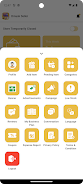





Dmusk Seller is an all-in-one business management app built to help small and medium retailers organize inventory, run promotions, and stay connected with customers from a single, easy-to-use interface. The app targets sellers of groceries, textiles, medication, food, and construction materials, offering a centralized place to manage product listings, process orders, and receive real-time updates so daily operations are easier to track and scale. Designed for merchants who need practical tools rather than complex systems, Dmusk Seller focuses on reducing repetitive tasks and improving visibility into stock, pricing, and order status.
Centralized inventory management lets you maintain product details, stock levels, and price lists in one place, with a simple product editor and quick search controls to find items by name, SKU, or category. The inventory interface is optimized for touch controls: tap to edit, swipe through product lists, and use filters to narrow results. These controls are intended to save time when updating many items during busy shifts.
Promotion and discount tools enable scheduled and time-limited offers that can be assigned to specific products or categories. Merchants can create discount campaigns, set start and end dates, and preview how offers will appear in the store listing. The workflow encourages checks and confirmations so discounts are applied consistently without manual recalculation at checkout.
Order processing and fulfillment features support a straightforward progression from order receipt to delivery or pickup. Orders present clear status stages — new, processing, packed, out for delivery, completed — so staff can follow a predictable workflow. The order view surfaces essential customer information, quantities, and payment status to reduce errors during preparation and handoff.
Store listing and customer reach capabilities help sellers publish product catalogs and descriptive listings that improve discoverability. The app supports category-based organization to mirror your physical shop layout, making it easier for customers to browse and for sellers to maintain consistent groupings across inventory and storefront views.
Onboarding through Dmusk Seller is incremental: new users are guided to add their first products, configure basic pricing, and activate an initial promotion. As a merchant becomes more familiar with the interface, they can adopt additional features such as bulk updates and scheduled campaigns. This stepwise progression helps users move from simple operations to more advanced inventory control without overwhelming them at the start.
Progression is also operational: repeated use of the app produces cleaner data, which in turn improves forecasting and daily planning. Merchants can track how promotion windows affect order volume and adjust stocking patterns accordingly, creating a practical loop of improvement that supports business growth over time.
The app favors a clean, functional visual style that emphasizes legibility and quick access to critical actions. Dashboards highlight current stock alerts, pending orders, and active promotions to help sellers prioritize tasks at a glance. Controls are arranged to minimize taps for common operations and to support both tablet and phone layouts so teams can use the device that best fits their workflow.
Accessibility considerations include readable font sizes, high-contrast elements for visibility, and straightforward navigation to reduce cognitive load for users who manage many products. The interface avoids clutter and presents only the most relevant options in each workflow step to reduce mistakes during busy periods.
Dmusk Seller offers basic customization to align the app with a store’s structure: configurable product categories, promotional templates, and localized pricing rules. These options let merchants tailor the system to their inventory mix without needing technical support. The app also emphasizes reliability by queuing changes when a network connection is unstable and syncing updates when connectivity returns, which helps maintain continuity during intermittent service.
Some features require initial learning and process adjustments by staff before they deliver full efficiency gains; training or a short familiarization period is recommended for teams adopting the app. Order delivery times and fulfillment performance still depend on local logistics and partner availability, and certain service reach or integration options can vary by region and market. These operational realities mean the app complements but does not replace a dependable local supply and delivery setup.
Overall, Dmusk Seller presents a practical toolkit for merchants who want to centralize inventory, streamline promotions, and make order handling more predictable. The app is designed to be a day-to-day operational companion that reduces manual work, supports clearer workflows, and helps sellers focus on growing their business.