Inspector
Version: 1.10.0
23.40MB
4.1
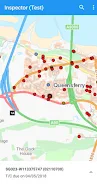
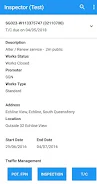
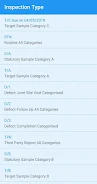

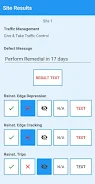
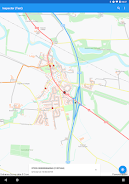
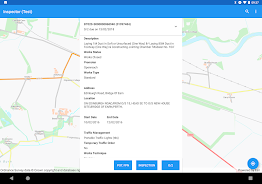
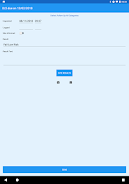
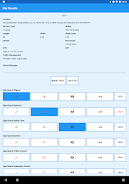
Inspector is a mobile tool designed to let registered SRWR users capture and submit Inspection Result transactions directly into the SRWR system. Inspector provides a focused, mobile-friendly interface that streamlines on-site data entry, helping field personnel record outcomes reliably and associate each entry with the official SRWR record. The app is intended for users who need to replace paper forms with a digital workflow and who have been authorized by SRWR Hosted Support; registration is required before any transaction can be sent to the central system.
The core workflow in Inspector is intentionally straightforward: an authorized user opens a new Inspection Result transaction, completes the structured fields that represent the inspection outcome, validates required items, and either save the record as a draft or submit it to SRWR. The progression system follows clear states (draft, ready for submission, submitted, synchronized) so users always know at a glance where a transaction stands. This stepwise progression reduces rework by prompting for missing information before submission and by keeping a local draft when a network connection is not available.
Inspector’s controls emphasize speed and accuracy. Forms use touch-optimized inputs, clearly labeled dropdowns, date and time pickers appropriate for mobile, and free-text fields for notes. Error validation is integrated into each screen to flag incomplete or inconsistent entries before a transaction can be submitted. The app supports common Android input methods — soft keyboards, copy/paste, and native accessibility input — so entering data on small or rugged devices remains practical. Simple progress indicators and clear action buttons guide users through multi-step inspections without unnecessary complexity.
To accommodate on-site conditions, Inspector caches draft transactions locally and performs synchronization with the SRWR backend when a reliable connection is detected. This offline-first approach allows inspectors to continue work in remote locations, then submit multiple transactions once connectivity is restored. Each submission is sent with metadata that ties the entry back to the official SRWR record for traceability. The app also provides basic retry logic and user feedback so operators can see whether a transaction was accepted, queued, or requires resubmission due to validation errors.
Inspector’s visual design focuses on clarity: a clean layout, high-contrast text, and color-coded status markers that indicate draft, pending, or completed transactions. The interface reduces clutter by showing only essential fields during data capture and using progressive disclosure for optional information. These choices help reduce input errors and speed up routine inspections while keeping the app approachable for new or infrequent users.
Many inspections follow consistent steps, and Inspector supports repeatable workflows by allowing users to start from a saved draft or reuse frequently used input patterns. While detailed form configuration is managed through SRWR policies, the app preserves common values and pre-fills previously used fields where appropriate to accelerate repeated submissions. The progression model also makes it simple for supervisors to audit the history of a transaction, view its lifecycle, and determine whether follow-up actions are required.
Inspector takes advantage of Android accessibility features so users with different needs can operate the app. Text sizing respects system settings, interactive elements are sized for touch accuracy, and descriptive labels assist screen reader usage. The app aims to work across a range of modern Android devices so inspectors can use company-issued phones, tablets, or other compatible hardware in the field.
One of Inspector’s primary benefits is that each submission remains linked to the SRWR record for audit and compliance purposes. This linkage helps organizations reduce paper-based workflows, centralize inspection results, and maintain consistent, auditable records. Because access and registration are managed by SRWR Hosted Support, administrators retain control over who can submit transactions and how those transactions are mapped into official records.
Inspector is intended specifically for creating and submitting Inspection Result transactions within the SRWR environment and does not provide broader project management or unrelated workflow features. Access is limited to registered SRWR users, so prospective users should contact the SRWR Hosted Support team to request registration and any necessary configuration. Support channels and documentation are provided through SRWR to help with onboarding, troubleshooting synchronization issues, and clarifying acceptable input for official records.