interlink
Version: 1.0.2
28.33MB
4.2
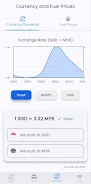
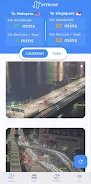
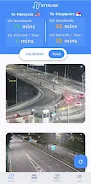
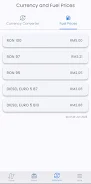
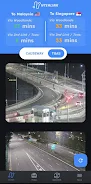
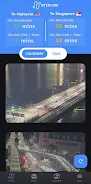
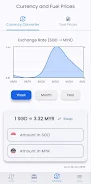
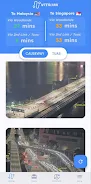
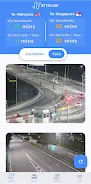
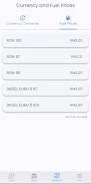
interlink helps commuters, delivery drivers and weekend visitors crossing the Singapore–Johor Bahru border by consolidating live checkpoint camera feeds, estimated queue times and traffic alerts into a compact, easy-to-scan interface so you can choose the best time and route across the Woodlands Causeway or Tuas Second Link.
The app integrates real-time traffic cameras for Woodlands Checkpoint, Tuas Second Link and several primary JB entry points so you can visually confirm road conditions before you leave. Estimated checkpoint wait times are provided in both directions (SG→JB and JB→SG) and are presented alongside the operational status of each checkpoint, including notices for temporary closures or lane restrictions. interlink also offers side-by-side comparisons of the two main crossings, instant traffic alerts for accidents or major delays, and a historical trends view that highlights typical congestion patterns for peak hours, weekends, public holidays and school breaks to support better planning.
Navigation focuses on simple gestures and clear controls: a home overview provides a quick snapshot of both crossings, a camera grid lets you tap any feed for a larger view, and a checkpoint detail screen displays current wait estimates and past trend charts. You can pin favorite checkpoints to the top of the home screen, mute or prioritize alert types, and use an interactive map toggle to switch between camera thumbnails and map-based routing. Controls are designed for one-handed use while stationary, with large touch targets and concise labels so users can check conditions quickly before starting a trip.
Rather than in-game progression, interlink provides a practical progression of personal convenience: the app adapts to your routine by letting you save favorite crossings and custom notification windows, and over time it surfaces suggestions based on your saved routes and review of historical congestion at times you commonly travel. That automatic familiarity means the app becomes more helpful the more you use it, offering tailored departure-time suggestions and highlighting recurring delay patterns that matter to your schedule.
interlink uses a clean, utilitarian visual design focused on legibility and quick comprehension. The main screens are organized into clear levels: an overview dashboard, camera gallery, checkpoint detail pages and a trends/history section. Camera images are presented with time stamps and source markers; trend charts are simple and color-coded for peak vs off-peak comparisons. A compact map view places camera points and checkpoint icons in geographic context so you can assess route choices visually rather than relying on text alone.
Users can customize notification thresholds, choose which checkpoint feeds to display first, and set quiet hours to avoid unnecessary alerts. interlink supports Android accessibility features such as adjustable text sizes and TalkBack compatibility so users with visual or motor impairments can access core information. High-contrast modes and clear iconography help make critical data readable at a glance in bright daylight or low-light conditions.
To remain useful when connectivity is intermittent, the app caches recent camera snapshots and the latest checkpoint estimates so you can still get a short-term picture of conditions while offline. Real-time accuracy depends on the availability of underlying feeds and official checkpoint reporting, so cached content is intended as a fallback rather than a substitute for live data. Notifications and alerts resume normal operation when a connection is re-established.
interlink is designed for repeated use: commuters will find it valuable for daily departures, delivery drivers can check feeds before dispatch, and casual travelers can confirm status for weekend trips. The combination of live visuals, predictive trends and quick alerts encourages routine consultation and reduces uncertainty at the border, making it a practical tool that improves in usefulness as you set preferences and review historical patterns.
The app is focused specifically on Singapore–Johor Bahru crossings (Woodlands and Tuas) and does not cover other regional routes. Checkpoint wait times are estimates and can change rapidly with sudden incidents or operational changes, and live camera availability depends on the external feeds maintained by checkpoint authorities. interlink is best used as a planning aid to reduce delays and avoid unnecessary idling, not as an authoritative source for enforcement or official checkpoint decisions.